
A Beginner’s Guide to Opening a Self-Directed TFSA with Questrade
Questrade is the platform I’ve used for over a year to manage my own investments. While the interface (UI) can occasionally be a bit clunky, it’s a solid, low-cost option for Canadians looking to take control of their TFSAs. I’m going to mention upfront that I am NOT a financial advisor. I’m sharing things I have learned through my own financial journey and that I believe could be a good fit for a lot of people. It is up to each of you to ensure it’s actually a good fit for YOU.
If you’re ready to move away from high-fee mutual funds and into self-directed investing, here is exactly how to get started with Questrade.
To keep the lights on at Happy Medium, some of the links in this post are affiliate or referral links. This means if you choose to sign up through them, I may receive a small commission at no extra cost to you. I only recommend tools I personally use or thoroughly vet for my own family. Thanks for supporting the site!
Step-by-Step: Opening Your Questrade TFSA
- The Basics: Go to Questrade.com and click Open an Account.
- Select Your Style: Choose Self-Directed Investing.
- Account Type: Select TFSA.
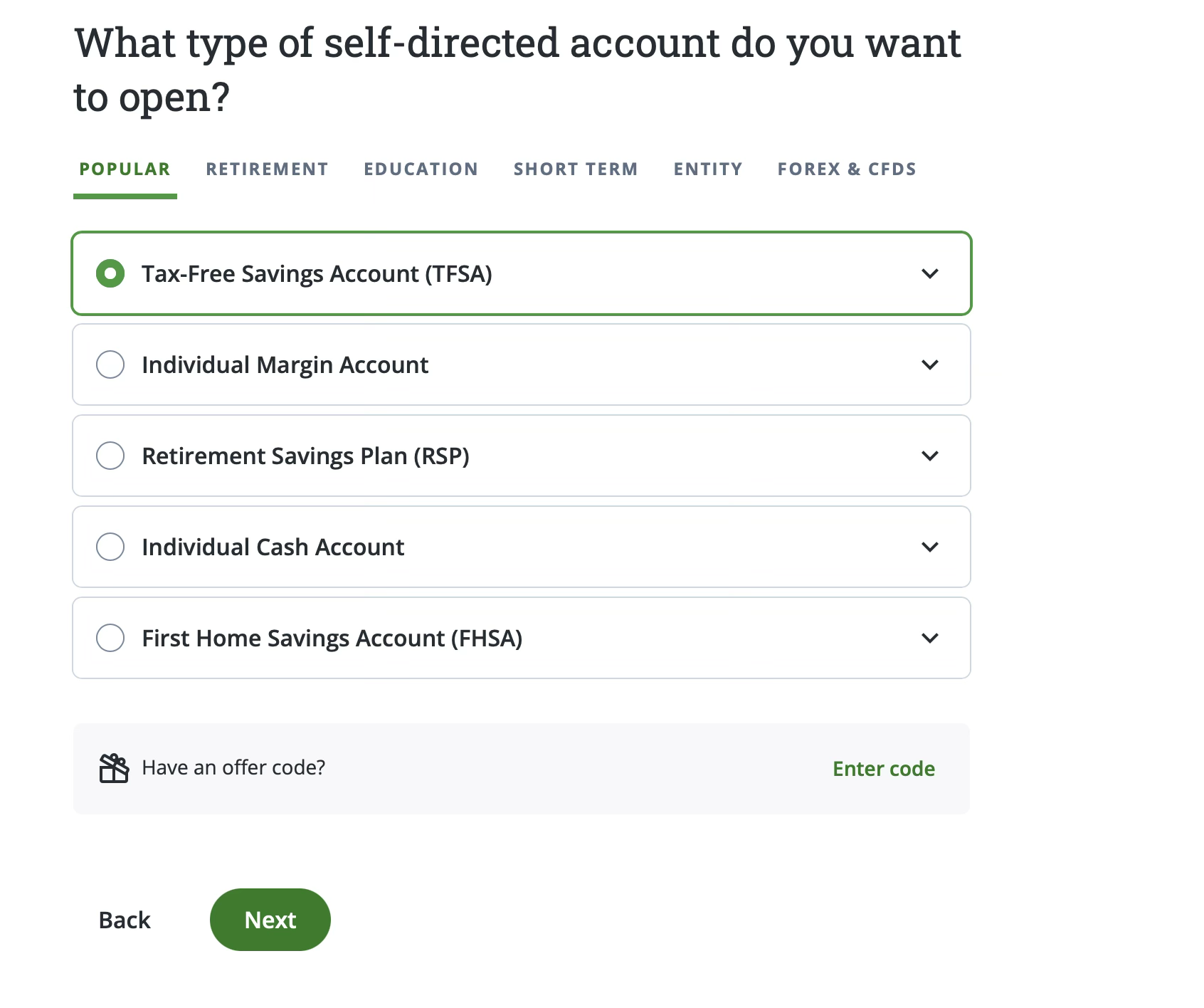
- The “Options” Question: During the setup, it will ask if you want to trade options. If you are planning on a basic, passive strategy like mine, select “No.” (This keeps things simpler and safer for beginners).
- The Paperwork (The “Confusing” Part): Once you accept the user agreement, you’ll need to e-sign documents and upload a photo of your ID. This was where I found Questrade’s process got a little confusing, but if I figured it out, so can you! You should be able to click on your account to see what tasks are outstanding. You will need to upload a picture of your ID in the Documents tab.
- Click Upload documents
- You’ll see a box that says “Drag and drop your file here, or browse”
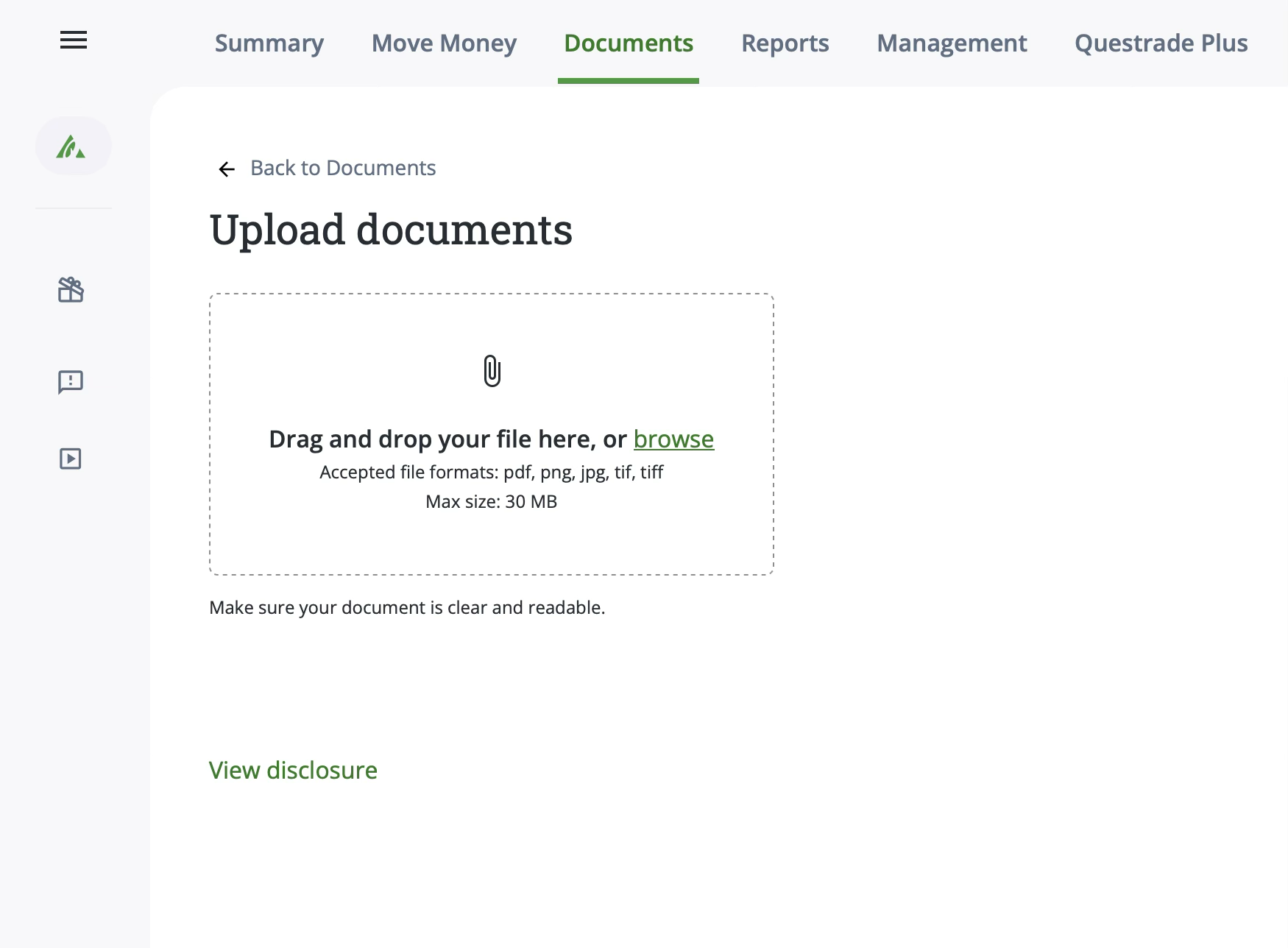
- Take a photo or photos of your ID including your signature, save them to a pdf, png, jpg, tif or tiff file, making sure it’s 30MB or less.
- Upload the file by dragging and dropping it to the box or browsing to it from the “browse” link on the page.
- Once you’ve added the file, the site displays more options.
- Under “Document type or form name” type “Gov” and choose “Government-issued photo ID”
- Under “Account(s)” choose your TFSA.
- Under details you can enter “Submitting required ID to complete account set up”
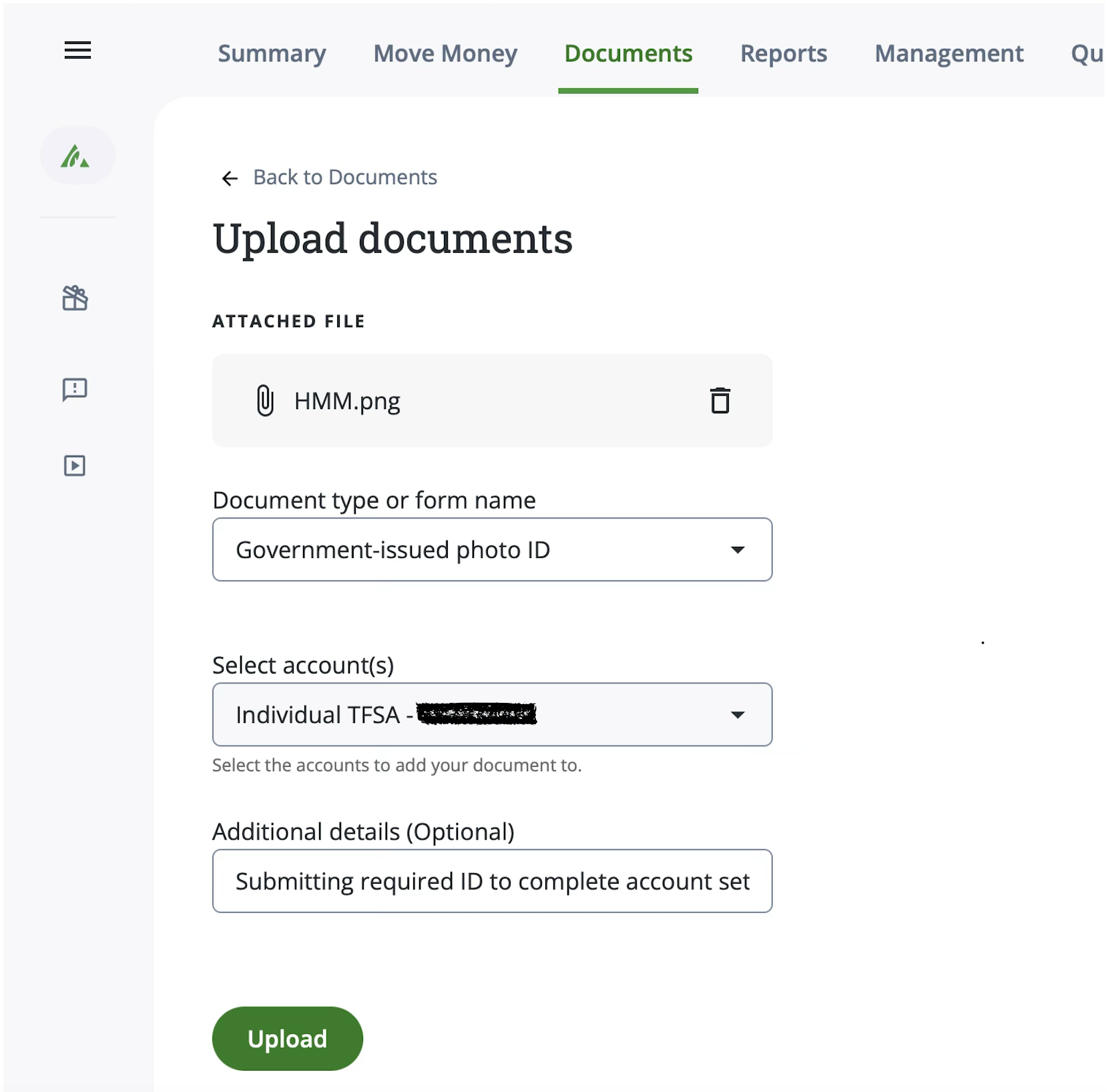
- Click “Upload”
Tips
You should receive an email letting you know either if there is a problem and you need to take additional action, or if your document was accepted.
I haven’t used it myself for signing up for an account but you can also use the QuestMobile app, and it will guide you through taking the ID photos as part of the process.
Don’t panic if your account isn’t active immediately. It usually takes a few business days for them to verify your documents.
Funding & Investing
Once your ID is approved, you can fund your account (most people use “Pay Bills” through their online banking). Now comes the big question: What do I actually buy?
Don’t Leave Your Money “Naked”
The biggest mistake people make with a TFSA is moving cash into the account and then… doing nothing.
A TFSA is like a container. If you put $1,000 in but don’t use that money to buy an investment product, it will just sit there earning nothing (and, in fact, losing a little value due to inflation). To make the most of the tax-free growth, you have to actually buy something inside the container.
Choosing Your Speed: ETFs vs. GICs/Bonds
While I personally use the ETF strategy mentioned below, that isn’t the right move for everyone.
- The Stock Market (ETFs): Best for long-term goals (10+ years) where you can handle the ups and downs of the market.
- GICs and Bonds: If you need this money in the next 1-3 years (maybe for a house down payment or a big trip) or if you absolutely cannot afford to lose a penny of your initial deposit, a GIC (Guaranteed Investment Certificate) or a Bond might be a better fit.
Questrade allows you to buy both GICs and Bonds right inside your TFSA. This gives you the safety of a guaranteed return without the risk of a market crash.
I’ll be doing a deep dive into how to buy GICs through Questrade in a future post, but for now, just remember: your money needs to be “put to work” once it hits your account
My Primary Investing Strategy
I personally use a one-fund passive ETF strategy. I can’t tell you what the best investment is for your specific life, but if you want to research the “All-in-One” funds that many Canadian passive investors use, here are the common tiers based on your risk tolerance:
- 100% Equity (Higher Risk/Long Term): VEQT.TO, XEQT.TO, or ZEQT.TO.
- 80% Equity / 20% Bonds (Growth): VGRO.TO, XGRO.TO, or ZGRO.TO.
- 60% Equity / 40% Bonds (Balanced): VBAL.TO, XBAL.TO, or ZBAL.TO.
- Conservative (More Bonds): VCNS.TO, XCNS.TO, or ZCON.TO.
Note: These are all commonly referred to without the “.TO” but on Questrade, they have .TO to indicate they’re on the Toronto Stock Exchange, which is what you want as a Canadian investor.
The “Set It and Forget It” Button: DRIP One of the best things you can do for long-term growth is turn on the DRIP (Dividend Reinvestment Plan).
- What it is: Shareholders of one of the above ETFs are paid dividends – a small payments as a reward for your investment. Instead of dividends sitting in your account as cash that you’ll manually have to reinvest, Questrade will automatically use that money to buy more shares of your fund.
- Where to find it: Go to Account Management —> Dividend Reinvestment.
- The Benefit: In a TFSA, this is “magic” because it doesn’t impact your contribution room or your taxes. It just grows your pile automatically.
Have questions about the Questrade setup? Message me on Instagram @HappyMediumMoney!